VPN Blog

In our VPN blog security experts offer you their knowledge about VPN, online privacy, security, Smart DNS and bypassing restrictions. You will also find the latest news and promotions that we run here at CactusVPN.

Cloud Converter for CactusVPN: Guide & Eligibility

What Is Cloud Converter

Cloud Converter is an addon tool included with CactusVPN 2‑year plans. It lets you convert and compress files securely in the cloud without installing extra software or relying on ad‑supported third‑party websites. Hosted privately by CactusVPN, it handles processing on our infrastructure to maintain performance and privacy.

Who Can Use It

  • Available exclusively with 2‑year CactusVPN subscriptions.
  • Not available on Annual or Monthly plans.
  • Access is granted immediately after upgrading to the 2‑year plan. Your VPN and Smart DNS services remain unchanged.

How to Access It

To open Cloud Converter, follow these steps:

  1. Connect to any CactusVPN server using your VPN application.
  2. Log in to the CactusVPN Client Area.
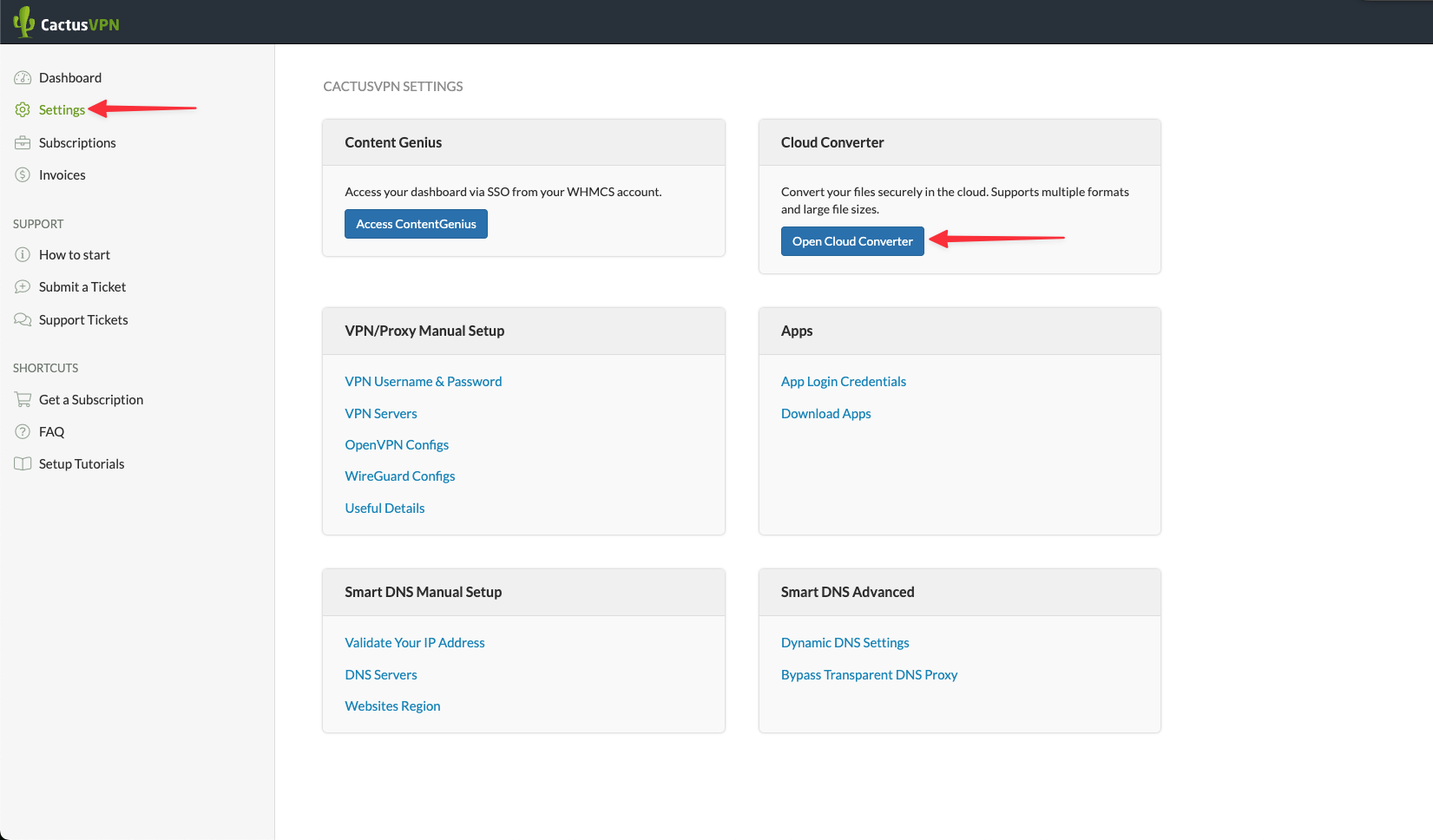
  3. From the left‐hand menu click on Settings.
  4. In the section labelled Cloud Converter click the button Open Cloud Converter.

How to Use Cloud Converter

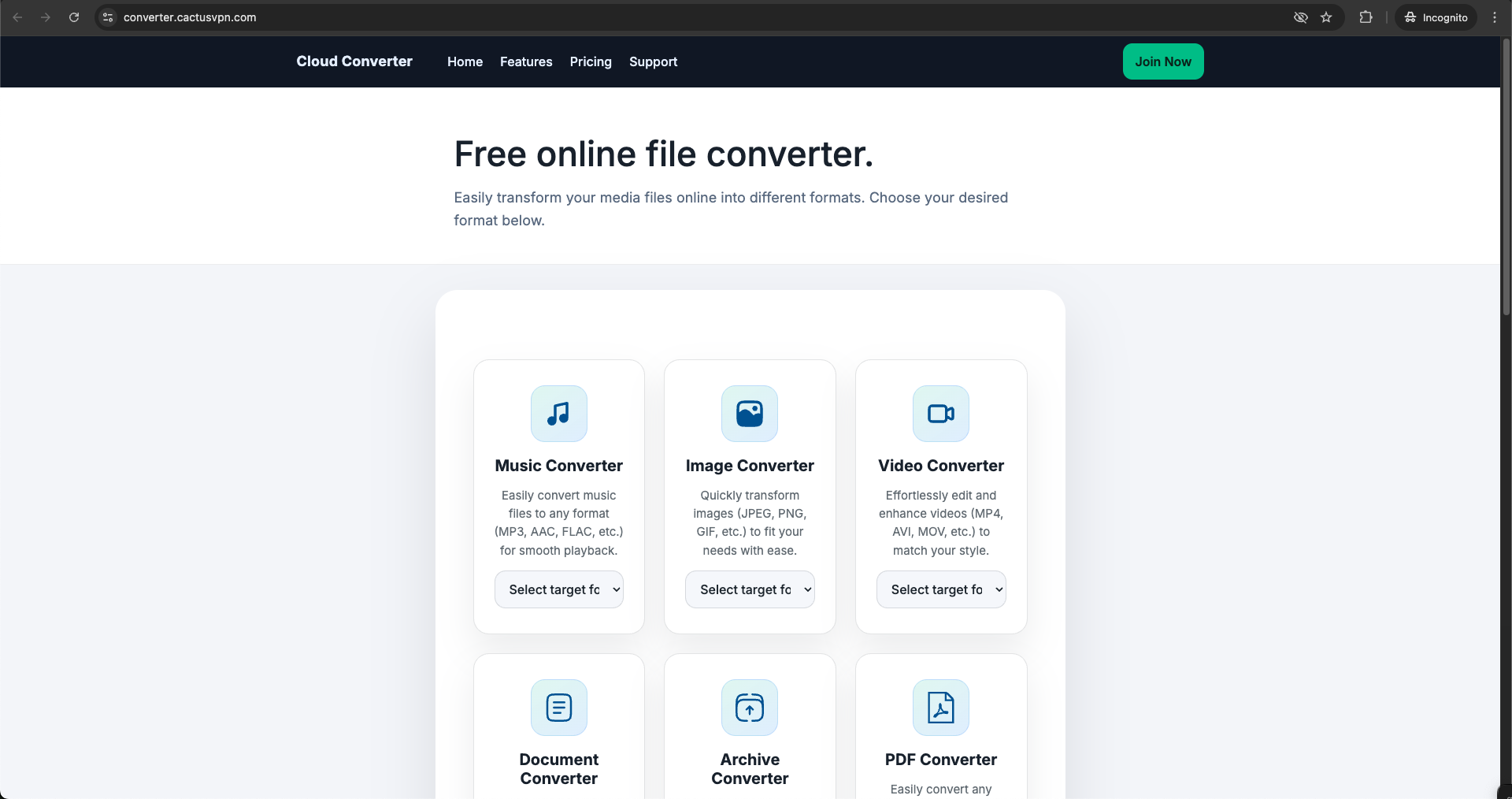
Once inside the dashboard, the layout is organised into clearly labelled tiles. Each tile corresponds to a function such as file conversion or compression. Below is a detailed walkthrough of how to carry out a typical task:

  • Step 1 – Choose your function: Click either the “Convert” or “Compress” tile depending on your goal.
  • Step 2 – Upload your files: Drag and drop one or more files (up to 10 files at once) or click “Select Files”. Each file can be up to 1 GB.
  • Step 3 – Select output settings: After upload y,ou will see format options. Choose your target format. If you selected “Compress”, you may also see quality or size settings. Adjust if needed.
  • Step 4 – Start the process: Click “Start” or “Convert”. You’ll see a progress indicator and estimated time for larger files.
  • Step 5 – Download or save your results: When processing completes, you’ll see a download link. Click it to save to your device, or use any supported cloud storage export option.

Example: Suppose you have four PNG images you want to convert to WebP and reduce file size: choose “Convert”, upload your PNGs, select “WebP” plus a quality slider (for example 80%), click “Start”, and download the output WebP files. The process for compressing a large PDF is similar: use “Compress”, upload the PDF, choose “Reduce File Size”, click “Start”, then download the smaller file.

Because everything runs through our private servers and you access it via the client area while connected to our VPN, you avoid ad‑heavy sites, extra software installs, and workflow interruptions.

Supported Formats

Cloud Converter supports hundreds of file formats across major categories, including:

  • Audio: MP3, AAC, FLAC, WAV, M4A, OGG and more.
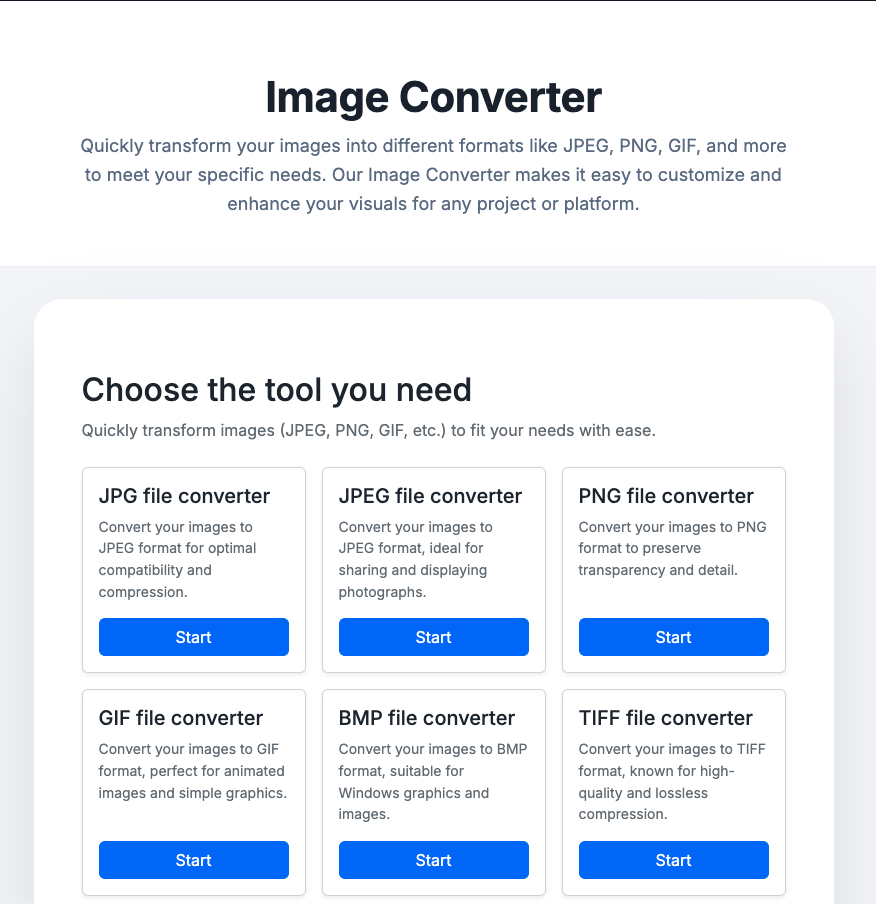
  • Images: PNG, JPG, GIF, BMP, SVG, WEBP and more.
  • Video: MP4, MKV, AVI, MOV, WEBM and more.
  • Documents: PDF, DOCX, PPTX, XLSX, HTML, TXT and more.
  • Archives: ZIP, RAR, 7Z, TAR.GZ and more.

Bulk tasks: up to 10 files can be processed simultaneously and each file can be up to 1 GB in size.

Privacy and Limits

  • Private Hosting: All conversions run on CactusVPN‐controlled infrastructure.
  • Auto Delete: Processed files are removed automatically after 24 hours.
  • Unlimited Use: There is no cap on the number of conversions for eligible users.
  • Access Control: Use requires an active VPN connection and login to your Client Area.

FAQ

Do I need to be connected to the VPN?

Yes. You must be connected to a CactusVPN server to access Cloud Converter.

Why don’t I see the “Open Cloud Converter” button?

That button appears only for users with an active 2‑year CactusVPN subscription.

Can I convert large files?

Yes. Each file can be up to 1 GB, and you can upload up to 10 files at once.

Can I buy the addon separately?

No. Cloud Converter is included only with the 2‑year plan and is not sold as a separate add‑on.

Content Genius AI for CactusVPN: Guide & Eligibility

What Is Content Genius

Content Genius is an addon available for CactusVPN clients with Annual or Biennial subscription plans. It is a web-based tool that helps you create usage guides, tutorials, support materials, and other documentation related to CactusVPN services. It also includes tools for structured writing, editing, and creating image descriptions for your guides.

Who Can Use It

  • Included with Annual and Biennial CactusVPN plans.
  • Not available on Monthly plans.
  • If you’re on a monthly plan, you will get access to these tools immediately after upgrading to the 1-year or 2-year plan. Your VPN and Smart DNS services remain unchanged.

How to Access It

Access to Content Genius requires an active VPN connection and a CactusVPN Client Area account. This is to ensure secure authentication through a Single Sign-On (SSO) link.

  1. Connect to any CactusVPN server using your VPN application.
  2. Log in to the CactusVPN Client Area.
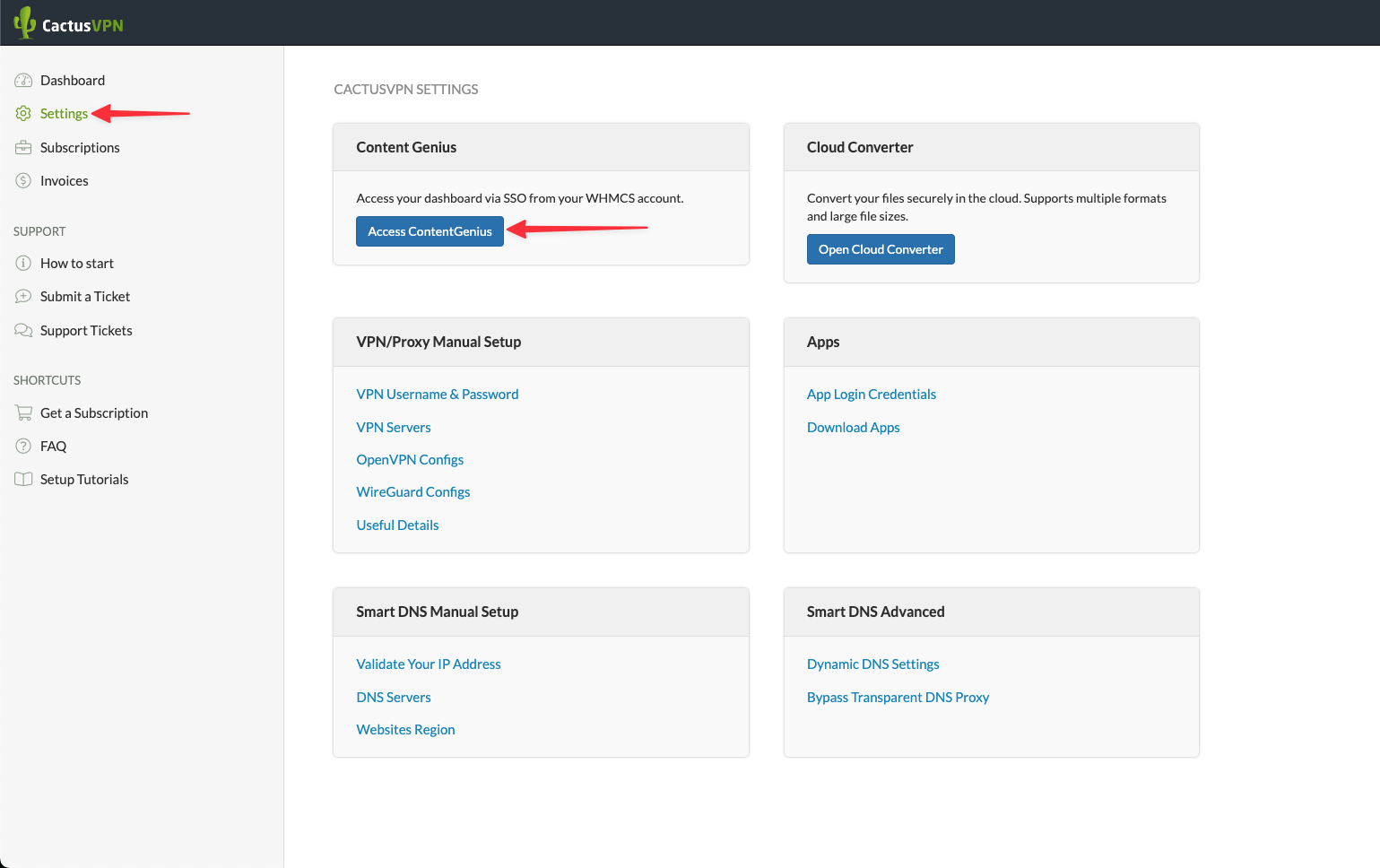
  3. Go to Settings in the left menu.
  4. In the Content Genius section, click the Access Content Genius button.
  5. The first click generates your secure SSO login link. Wait until the link is created.
  6. Click the button again. This will open Content Genius in a new browser tab and sign you in automatically.

You can now use the Content Genius dashboard with your CactusVPN credentials. The connection must remain active for the session to function correctly.

How to Use Content Genius

After you access the dashboard, you will see the main menu on the left side. It contains Dashboard, Templates, Documents, and Images. Each section serves a specific purpose.

  1. Dashboard shows your overall usage and quick access to sections.
  2. Templates lets you start with predefined structures such as Article, Outline, Paragraph, Social, Website, and Marketing. Choose a format, then edit it for your use case.
  3. Documents allows you to create or manage your drafts. Click New, give it a name, write your prompt, and press Generate. You can then refine, save, or export the text.
  4. Images provides tools to describe or create visuals. Add a name, description, and resolution, then click Generate. You can later include these images with proper alt text and captions.
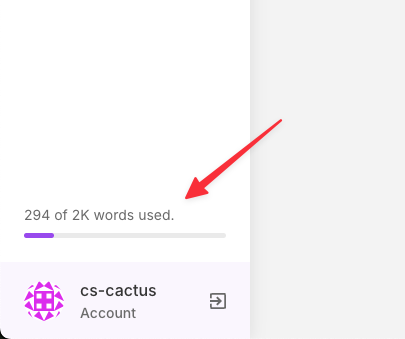
  5. Your usage progress bar is displayed at the bottom left of the sidebar (for example “294 of 2K words used”). This shows your remaining monthly allowance.

    Usage Limits

    • Words every generated or rewritten piece of text uses part of your monthly word quota.
    • Tokens are counted internally and converted automatically to words in the usage meter.
    • Counting rules Documents, and image descriptions consume words. Transcriptions may have a separate limit depending on your account settings.
    • No upgrades the Content Genius quota cannot be extended or upgraded during the billing cycle. Once the limit is reached, you must wait for the next monthly reset or renewal period.
    • Monitoring you can view usage details under Account → Plan and track live progress in the sidebar meter.

    What It Does

    • Writing and documentation create clear and structured usage guides, troubleshooting instructions, and support materials.
    • Templates library access over one hundred prebuilt templates for content, website, marketing, and communication tasks.
    • Text improvement rewrite, summarize, or expand existing text. Fix grammar and formatting for clarity.

    • Outlines and sections generate outlines, titles, subheadings, and well-formatted paragraphs.
    • Content management store all generated drafts in the Documents area for future use or revisions.
    • Visual assistance create or describe images for your documentation. Set resolution and add style or medium if needed.
    • SEO helper suggest alt text, captions, and filenames for images to make them SEO-friendly.

    • Translation support prepare texts in multiple languages and adapt them for other audiences.

    • Export ready content copy finished sections into WordPress with headings, IDs, and schema-ready HTML.
    • Account tools use your CactusVPN SSO login, view your plan details, and monitor word usage directly from your account dashboard.

    Although Content Genius includes templates for blog and marketing content, CactusVPN uses it mainly to create internal documentation, how-to articles, and client support materials.

    What It Does Not Do

    • It does not publish automatically to your website. All content must be reviewed and saved manually in WordPress.
    • It does not modify your VPN or Smart DNS settings.
    • It does not change or affect your CactusVPN subscription or service configuration.

    FAQ

    Do I need to be connected to the VPN?

    Yes. You must be connected to a CactusVPN server before accessing Content Genius. The VPN connection is required to validate your SSO login securely.

    Can I increase the word limit?

    No. The word allowance resets automatically every month. There is no upgrade or add-on to extend the quota during a billing period.

    Where is the Access button?

    Go to Client Area → Settings → Content Genius and click Access Content Genius. The first click creates your SSO link, and the second opens your dashboard in a new tab.

    Can I use Content Genius for blog posts?

    The system includes templates for general writing, but at CactusVPN it is mainly used for internal documentation, guides, and client support text.

    What happens when I reach the limit?

    When your word allowance is used up, new generations will pause. You can continue editing existing drafts but must wait for the next monthly reset to generate new text.

What Does a VPN Hide? (And What It Doesn’t)

What Does a VPN Hide

What does a VPN hide, exactly? And what doesn’t it hide?

We’ll do our best to answer those questions in this guide. We have a full FAQ section down below, so feel free to skip to the question that interests you the most.

Continue reading

Get the Best VPN for Multiple Devices Right Now

best vpn for multiple devices

Should a VPN work on multiple devices or just one or two?

We’ve been asked that a lot lately, and we saw some people on Reddit wondering about that too. We’ll tell you why a multi-device VPN is the right pick in this article, and we’ll also show you how CactusVPN is the best VPN for multiple devices.

Continue reading

Is a VPN Safe for Online Banking?

Is a VPN Safe for Online Banking

Internet banking has become more and more popular – especially since the COVID-19 pandemic started. It’s not surprising seeing how convenient it is. But just how safe is online banking, actually?

Well, the security normally is pretty decent. Still, hackers have been ramping up their attacks against online banking – at least according to the FBI. So you should take some precautions.

Does that mean you need to start using a VPN? Is a VPN safe for online banking to begin with?

Continue reading

How to Get a US IP Address (4 Options)

Get a US IP Address

Interested in switching your IP address to a US IP address? Or want to learn more about why some people do that?

You came to the right place! We hope this guide will answer all your questions.

Continue reading

Can You Be Tracked If You Use a VPN?

Can You Be Tracked If You Use a VPN?

VPNs are an excellent way to protect your online privacy and data. Besides unblocking geo-restricted content, that’s probably the second main reason people use VPNs in the first place.

There’s just one thing that’s probably on your mind – can you be tracked if you use a VPN?

Continue reading

Can ISPs Block VPN Connections?

Can ISPs Block VPN

VPNs are awesome tools – they help you unblock geo-restricted content, stop bandwidth throttling, secure your data, and so much more. 

Not to mention they stop your ISP from snooping on your web traffic. Though, you have to wonder – can ISPs block VPN connections if they want to? Assuming they have a problem with you using a VPN in the first place.

Well, we hate to be the bearers of bad news, but yes, they can do that. We’ll show how they can do it, and offer some solutions + answer some relevant questions.

Continue reading

What Is the Netflix Proxy Error? (How to Fix It)

Netflix Proxy Error

Netflix is full of awesome entertainment. Too bad you gotta deal with geo-blocks to enjoy all of it. Luckily, VPNs and proxies help you bypass them.

At least until you see the Netflix proxy error.

That doesn’t have to be the end of the good times, though. We’ll tell you all about that error in this article, including how to bypass it.

Continue reading

Does a VPN Protect You from Hackers?

Does a VPN Protect You from Hackers?

VPNs can do a lot – bypass firewalls and geo-blocks, hide your browsing, help you get better deals, etc.

But does a VPN protect you from hackers too? You probably know it encrypts your traffic, but does that mean you’re safe from all cyber attacks?

Continue reading

Do You Need a VPN at Work?

Do You Need a VPN at Work?

You’ve probably seen a ton of articles talking about why you should use a VPN, but have you ever asked yourself if you need a VPN at work?

There actually are some perks if you use the service, but getting a VPN at work isn’t so simple. We’ll cover everything you need to know in this quick article.

Continue reading

How to Unblock Online Games at School Today

Bummed out you can’t spend your lunch break or boring classes playing your favorite games on Miniclip or Kongregate? Or that you can’t check the app store for the latest releases, or run the online games on your device?

It’s frustrating, we know, but – luckily – there are ways you can unblock online games at school. Here’s all you need to know:

Continue reading

7 Simple Tips to Get Facebook Unblocked at School Fast

unblock facebook at school

Facebook is a great website to pass the time, entertain yourself, and keep in touch with your friends. It’s just a shame you often have to get Facebook unblocked at school first before you can enjoy it.

Don’t worry, though – doing that isn’t as hard as it seems. We’ll show you what you need to do to unblock Facebook at school quickly and easily in this article.

Continue reading

Want to Get Instagram Unblocked at School Quick and Easy?

Instagram Unblocked at School

Instagram is an awesome platform where you can meet new people, chat with friends, and show the world how much fun you had at your best friend’s house party over the weekend.

Unfortunately, all that stops if you’re one of the many unlucky students who need to get Instagram unblocked at school.

Continue reading

Is Tor Safe for Online Browsing? (Not Really – Here’s Why)

Is Tor Safe

With nearly two million people using it, the Tor network is one of the most popular ways to anonymize your online browsing right now.

But you got to wonder – is Tor safe, actually?

Continue reading

The Top 8 VPN Security Risks (What to Look Out for)

vpn security risks

VPNs are a great way to protect your Internet traffic and privacy from government surveillance, ISP snooping, and nosy hackers.

But did you know you can also expose yourself to VPN security risks if you’re not careful?

Here’s all you need to know about that.

Continue reading

Should I Leave My VPN On All the Time?

Should I Leave My VPN On All the Time?

VPNs are extremely useful. They make the web much more enjoyable, safer, and convenient.

But when you consider all of that, you probably wonder – “Should I leave my VPN on all the time?”

Well, there are specific situations when it’s a good idea to do that. If you want to learn more about them, keep reading.

Continue reading

PeerBlock vs. VPN (What Works Best for Torrenting?)

PeerBlock VS VPN

If you’re into torrenting, and are worried about getting in trouble because of it, you’ve likely heard people talking about how using a VPN or PeerBlock can help you with that.

But when it comes to PeerBlock vs. VPN, which option works best?

Continue reading

Do I Need a VPN on My iPhone? (7 Reasons You Do)

iPhones are pretty versatile and secure, and they’re convenient to use whenever you want to browse the web – at home, at work, or on the go.

But you’re probably asking yourself: “Do I need a VPN on my iPhone to enjoy an even better online experience?

The quick answer is a resounding “Yes.” If you want to know why, read on.

Continue reading

VPN Not Working? Here Are Some Useful VPN Troubleshooting Tips

VPN Not Working

VPN not working? Worried you can no longer protect your Internet privacy and bypass unfair restrictions?

No problem – here’s a list of VPN troubleshooting tips that might help you solve the problems you’re dealing with.

Continue reading

6 Reasons to Use a Military VPN If You’re in the Army

military vpn

Joining the military can be a life-changing experience, but it also means spending long periods of time away from your lover, friends, and family, and not being able to browse the Internet without dealing with cyber security threats and content restrictions.

While there are plenty of online resources on how to deal with separation from those close to you, there isn’t enough info on how to solve the second issue.

No need to worry, though – we’ll show you how to use a military VPN to enjoy the web like everyone else.

Continue reading

How to Torrent Anonymously (5 Easy Methods)

How to Torrent Anonymously

Torrenting traffic used to be declining, but not anymore. It seems more and more online users have turned to BitTorrent traffic to escape the shackles of overpriced streaming platforms and exclusive content.

That’s pretty understandable. But if you’re one of those Internet users, you should learn how to torrent anonymously to make sure you don’t end up in any trouble.

If you’re not sure where to start, don’t worry – here’s everything you need to know about anonymous torrenting.

Continue reading

Complete List of Websites Only Available in UK (How to Unblock Them)

Websites Only Available in UK

The UK entertainment scene is simply wonderful. You have tons of memorable, popular, and fun to watch shows like “EastEnders,”“Fawlty Towers,”“The Office,” and “Blue Peter.” Unfortunately, you can only enjoy most of that content on websites only available in UK.

If you are outside the country, tough luck – that seems to be the way content providers approach this topic.

Well, no longer. We’ll show you a list of UK-only websites, discuss why you can’t access them, and offer you easy ways to unblock them.

Continue reading

VPN Advantages and Disadvantages (Everything You Should Know)

VPN Advantages and Disadvantages

VPNs are more popular than ever nowadays, but – despite that – there are still plenty of people who don’t know what such a service can offer them. Well, we’re going to be discussing the real benefits and disadvantages of VPN services in this article, so that you’ll have an easier time deciding if they are right for you or not.

Continue reading

Here’s a Restricted Websites List of US-Only Websites

US entertainment is beyond enjoyable. The country very often offers the best when it comes to music, movies, and TV series. It’s just a shame that most of that content is only available on US-only websites – meaning that if you live outside the US, you’re out of luck and can’t enjoy it.

If this is a topic that interests you, this article will be right up your alley. We’ll be discussing why some websites are only available in USA, how you can actually unblock them, and we’ll even offer a few select examples of US-only websites, and a whole US restricted websites list as well.

Continue reading

Why Is Google Asking for Captcha When You Use a VPN?

Google Captcha

When you use a VPN, Google CAPTCHA might take you by surprise. One moment you’re freely looking up things you want on Google, and the next your screen is filled with the “We’re sorry …” message.

If you’re curious why this happens when you use a VPN, we’ve got you covered. Here’s all you need to know about that.

Continue reading

How to Unblock Websites (10 Methods)

How to Unblock Websites

Did you ever want to browse a website you thought would be really great but weren’t able to connect to it (even though your Internet connection was fine) or just got a message telling you the content wasn’t available in your country/region?

You’re not alone – blocked websites is something people around the world have to put up with. No worries, though – we’ll show you exactly how to unblock websites in this handy guide.

Continue reading

Using a VPN Slows Down Internet – True or False? VPN Speed Explained

VPN Slows Down Internet

Ever wondered if a VPN slows down Internet connection speeds? It’s a pretty popular topic – in fact, many people like to claim VPNs either slow down Internet speeds or speed them up.

Well, there are a lot of things you need to consider when thinking about VPN speed – and we’ll discuss all of them in this in-depth guide. We’ll also tell you which VPN speed tests you can use to see how your connections are doing.

Continue reading

HTTPS vs VPN – What’s the Difference?

HTTPS vs VPN

HTTPS vs VPN services – what’s the better option?

This is a question we got asked lots of times by our users and other people online. So, we put together this article to showcase what HTTPS and VPNs actually are as well as what sets them apart, so that people can understand why it shouldn’t be a matter of HTTPS vs VPN tech since both of them work well together.

Continue reading

How to Secure Chromecast

How to Secure Chromecast

Chromecast is definitely an amazing device when it comes to modern entertainment. Though, all the convenience of being to cast your mobile screen on your TV does make you wonder – how secure is Chromecast actually?

Well, while there might be some concerns, you don’t need to worry that much. Making your device more secure isn’t really difficult. In fact, we’ll show you exactly how to secure Chromecast in this 4-minute article.

Continue reading

Here’s the Best Way to Test VPN Connections

Test VPN Connections

Want to test VPN connections to make sure everything is running as it should but not sure where to start?

No worries – we’ve put this guide together to show you exactly what VPN tests you should run to check your connections, and how to do it as well.

Continue reading

6 Reasons You Need to Use a VPN for Travel

vpn for travel

Not sure if you should use a VPN for travel during your next vacation? Don’t worry – we’ll tell you everything you need to know about this.

Now, the short answer is yes, you should definitely use a VPN when traveling abroad. In case you’d like to know exactly why, just read on or use our Table of Contents links.

Continue reading

What Are the Main Benefits of VPNs?

Benefits of VPNs

Ever wondered what the benefits of VPNs are? Well, we aim to answer all your questions with this thorough article.

We’ll start out by showcasing the main advantages in a clear, streamlined list. For those of you who’d like a more in-depth look at the benefits of VPN services for specific scenarios, we’ve got you covered with the rest of this article – like how a VPN can help your business, how a VPN service can make traveling more enjoyable, and other interesting stuff like that.

Continue reading

VPN vs. Firewall vs. Antivirus – What’s the Difference?

VPN vs. Firewall vs. Antivirus

A lot of people like to debate the topic of “VPN vs. firewall” or “VPN vs. antivirus,” trying to promote one solution over the other. But the truth is that VPNs, firewalls, and antivirus software work best in unison, not separately.

To help you better understand why, we’ll go ahead and explain what a VPN, a firewall, and an antivirus are, and how firewalls and antivirus software are different from VPNs.

Continue reading

How to Choose the Best VPN Server Location

Best VPN Server Location

Selecting the best VPN server location can be difficult if you are new to VPNs. Even people who have been using VPNs for a while can encounter difficulties sometimes.

Well, don’t worry – we’ll go ahead and explain what things you need to keep in mind when choosing a VPN server.

Continue reading

Here’s How Easy It Is to Enjoy Unblocked Music Sites & Apps

Unblocked Music

The Internet is full of amazing music streaming websites and apps. Some of the most popular examples would include Pandora Radio, iHeartRadio, Amazon Music, Spotify, Apple Music, Radio.com, SoundCloud Go, Napster US, and TuneIn Radio.

It’s just a shame that – quite often – you can only enjoy what they offer after you unblocked the music sites in question.

That’s right – depending on various factors – you might not have full access to any music streaming website or app you want.

Continue reading

Is Using a VPN to Get Cheaper Flights Possible?

using vpn to get cheaper flights

Whether you’re just going on vacation or on a business trip, it’s extremely easy to spend anywhere between a few thousand dollars up to tens of thousands of dollars per year on airline tickets nowadays – depending on how frequent you fly, and where you fly to.

Things might not be this bad if airlines wouldn’t rely on online price discrimination so much. It’s actually why many frequent travelers have started using VPNs to get cheaper flights too.

Continue reading

What Are the Benefits of Using a Proxy Server?

Benefits of Using a Proxy Server

Ever wondered if there are any worthwhile benefits to using proxy servers?

Well, as a matter of fact, there are a few decent advantages (but also drawbacks) you as an online user should consider when deciding whether or not to use such a service.

Continue reading

7 Reasons You Need to Use a VPN for Gaming

VPN for Gaming

Nowadays, you can’t really enjoy a quality gaming experience when you’re online without using a gaming VPN. And while you might think that VPNs are only used to secure people’s data and privacy, the reality is that they can do much more than that.

In fact, they can make playing online a more fun experience. If you don’t believe us, just take a look at the main reasons you need a gaming VPN in the first place:

Continue reading

Free VPNs vs. Paid VPNs – What Are the Differences?

free vpns vs paid vpns

Are there any major, noteworthy differences when it comes to comparing free VPNs vs. paid VPNs? Other than the price thing, obviously. After all, they’re both VPNs, so they should be able to offer you the same experience, right?

Not quite. In fact, when you start taking a closer look at the main disadvantages that set free VPNs apart from their paid counterparts, that’s when things really start to get interesting – but not in a good way, unfortunately.

Continue reading

Why You Need to Hide Your IP Address on Android

hide ip address on android

Each month, there are over 2 billion active Android devices registered by Google, making it safe to assume that there are at least 1 billion monthly active Android users (if not more) on the market. That’s 1 billion people – or more – whose personal data, online privacy, and digital freedom is in constant danger – provided they don’t bother to hide IP addresses on Android devices they own and use.

Continue reading

4 Ways to Use a VPN for SEO

VPN for SEO

The SEO industry has been making massive gains over the past years. More individuals and businesses rely on SEO to improve their branding, social reach, and online traffic – and the money spent on SEO backs that up. Back in 2016, the US alone accounted for $65 billion being spent on SEO, with the numbers being expected to rise to around $79 billion by 2020.

Continue reading

How to Get Spotify Unblocked with VPN

Spotify Unblocked

Spotify is a popular music platform that lets you access thousands of songs from a multitude of artists. It also allows you to tailor-make your own playlist and let it play for hours at a time.

But what about the restrictions against this service applied by your school? Or the regional licence agreements that prohibits access to the platform? In this post, we’ll look at how to get Spotify unblocked at school or anywhere else using a VPN service.

Continue reading

Apple removes support for PPTP VPN on iOS 10 and macOS Sierra

CactusVPN app

As part of preparing for the release of iOS 10 and macOS Sierra, Apple publicly announced back in July that they are removing PPTP support from Apple’s integrated VPN client owing to a number of security vulnerabilities in the VPN protocol. MacOS Sierra and iOS 10 users will forgo the option of PPTP VPN on iOS once they upgrade. This means users will be unable to create a manual connection with PPTP protocol.

Continue reading